Custom controllers. Pro controllers. Sony licensed vs. third parties. There are a wealth of options out there, but sometimes you just want the classic DualShock 4 look and feel. Third-party options from the likes of Astro and SCUF come with great features, but some people simply don’t like the different shapes and feels of those controllers. Mega Modz aims to bring pro controller features home to the classic DualShock 4, and its new Macro Remap controller adds even more features to help players get the most out of their gaming. With programmable back buttons, macro capabilities, and the ability to customize the controller to you—all while retaining the standard DualShock 4 look and feel—Mega Modz delivers an incredible amount of quality with its controllers.
While you could go buy one right off of Amazon, why not make it your own? Mega Modz features a robust controller builder on its site, allowing you to make the DualShock 4 you’ve always wanted. Before we get into the actual features of the controller itself, this is a great place to start.
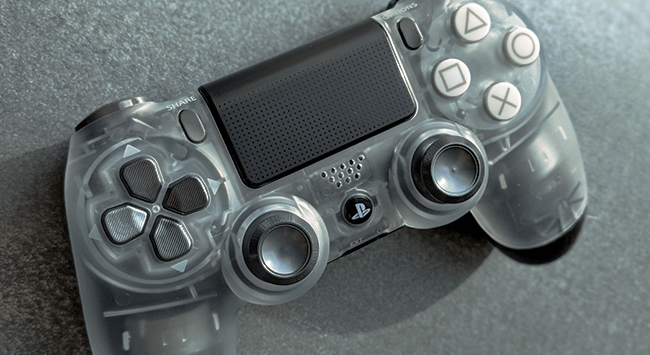
Mega Modz allows you to customize nearly every aspect of the controller. Choose your shell, d-pad, face buttons, thumbsticks, and even PS button. I’ve personally longed after the Crystal DualShock 4, so even though there are plenty of other custom designs, I built mine around that translucent aesthetic, opting for an aluminum metal d-pad, white face buttons with gray symbols, and aluminum metal thumbsticks. I left the PS button stock black and white because none of the chrome ones really fit my look. During the process, the image on the site changes so you can clearly see what your selections look like before committing to your order, particularly important because different customization options can have a varying effect on the price of the controller.
While you also have the option to choose a custom back, we reviewed the Macro Remap controller which requires the rubberized black back, so keep that in mind as you create your look. You won’t be able to change it if you want the Macro Remap option. Here’s a quick look at what I ended up with:

The build is exceptionally solid. Despite being fully custom, this thing feels like it came directly from Sony. I was concerned the buttons might feel a bit “fiddly” or wiggly, but everything is pieced together in such a way that this controller doesn’t feel “lesser” than an OEM DualShock 4. In fact, because Mega Modz uses the actual DualShock 4 as a base for its customs, you’ll barely notice a difference except in the added features (or in the case of mine, aluminum d-pad and thumbsticks).
I do have to note that it seems like Mega Modz availability of custom parts changes periodically with what’s in stock at the time. Checking the custom site again, it looks like the options for the gray aluminum d-pad and gray aluminum thumbsticks are no longer there. They also had a polished chrome PS button that isn’t an option anymore, however, there are a number of options that weren’t available when I ordered that are now present too. If you don’t see exactly what you are looking for, it might be worth reaching out to them to see if there’s anything they can do.
Mega Modz Macro Remap PS4 Controller – The Proof is in the Back Buttons
It’s all well and good if a controller looks nice, but we’re really here for the macro remap feature, a custom modchip in the controller that catapults it to pro status very quickly. The rear of the controller is fitted with two added buttons on the grips, natural feeling and easy to press with the middle fingers, but also never feeling like they are in the way of how you’d naturally hold the controller. Being buttons and not paddles, the feedback of pressing them is instant. They also feel solid, like a natural extension of the controller and not a fiddly add-on. That’s a theme with the Mega Modz custom work that I was consistently impressed with. These controllers are exceptionally well put together.

Like all pro controllers with back buttons (or even Sony’s own back button attachment for the DualShock 4), you can quickly customize these buttons to any of the stock buttons except for Options, Share, the PS Button, and the Touchpad. Everything else is fair game, even setting them to function as L3 or R3 stick clicks if you’d like. The process for remapping the buttons is exceptionally simple. Hold down the small Macro Remap switch (red button in the image above), then the rear button you with to program, and then the stock button you want to assign. Hold that combination for two seconds and a brief vibration will let you know you’ve successfully remapped it, along with a custom colored light on the small LED module on the bottom providing additional information about which button you’ve assigned and where.
I’ve already waxed poetic about back buttons and how much they add to the experience. Mapping something like square to the back button allows you to revive a teammate in Destiny while still being able to aim. Setting it to X lets you jump without removing your finger from the thumbsticks. The fact that our thumbs need to cover so many buttons on the surface of the controller means we can’t do everything all at once, but back buttons open up options for heightened gameplay experiences you may not have even known were possible. Give them a chance for a week and I promise you’ll see your gameplay improve across a variety of game types, not just shooters.

Where Mega Modz differs from its competitors is in the Macro Remap modchip that not only allows you to remap the buttons, but set up a variety of macros for button presses as well. While you can’t preload a multi-button combo into a single button press (ie. you can’t make the back button do X > Square > Triangle), you can enable a number of single-button functions like Turbo mode (holding the button will press and release the assigned button repeatedly, ie. “mashing” the button), double tap, triple tap, and continuous press (click once and the controller will mimic holding the button down).
Getting even more into the nitty-gritty of these features, the timing of the macro presses is all completely customizable, down to the tens of milliseconds. Starting to dive into the macro sub-modes does get a little bit more complicated than the simplicity of the button remap, but it’s still relatively easy to understand using the included operational guide. The LED light module clearly indicates what you are doing too, which helps navigate this task.
Mega Modz Macro Remap PS4 Controller – Are Macros Cheating?
When you get into custom controllers that make it arguably easier for player to perform certain tasks, it begs the question if it could be considered cheating. Turbo controllers have been around since the ’90s, allowing people to button mash without wearing out their thumbs. But is it fair to be able to get off a quick double-tap in an online competitive shooter without having to physically pull the trigger twice? Is making a single-shot weapon into a full-auto gun through the controller fair play? It’s certainly an area that’s up for debate. Mega Modz asserts that no, macros are not cheating, though it’s certainly a grey area. Even people with back buttons arguably have an advantage over those without, and Sony sells its own back button attachment.

Personally, while I used the turbo and macro functions for some single-player games (and tested them out through some PVE shenanigans in Destiny), I’m not about to go utilize these functions as an “easy mode” while playing something like Mortal Kombat 11 online. Is that my morals getting in the way? Possibly. Could you get away with using the macro functions in online games? In all likelihood, yes. It’s simply modding and remapping the controller inputs, so nothing within the game itself is technically being modded. It’ll just be up to your conscience whether or not you feel like it’s fair play to use these features (and I would say arguably makes you “worse” at the game, as you lean on the crutch of the controller doing the work for you).
Simple back button remaps, however, take a certain amount of skill to use but have a higher skill ceiling once you do start using them (similar to using mouse and keyboard versus controller). It’s up to you how you want to use these options though, and they definitely have a lot of unique uses within a variety of single-player games too, particularly the more typical turbo function.
Mega Modz Macro Remap PS4 Controller – Futureproofing
This review comes around at quite an ironic time, just as the DualSense was announced earlier this week. With the PS5 and its new controller on the horizon, it’s a tough ask to fork over more than $100 for a custom DualShock 4. Fortunately, Sony’s already confirmed that the DualShock 4 will be compatible with the PS5. Sure, it won’t have unique features like the haptic feedback of adaptive triggers, but if you like the look and feel of the DualShock 4, you can still use it next-gen. Because Mega Modz uses the OEM DualShock 4 as a base for the custom controller, compatibility is not in question (which can’t be said of other third-party Pro controllers). That means I can still take my lovely custom crystal Mega Modz Macro Remap controller and keep using it with the PS5 too.

And after using it for more than a month, it’ll easily last you into next-gen. I have to reiterate again how solidly it is built and how well put together everything is. None of the buttons have gotten looser at all and everything still functions perfectly, even after some intense gameplay sessions using it with the likes of Call of Duty Warzone, Destiny 2, and Final Fantasy VII Remake. Even with games that don’t have obvious benefits or uses for the back buttons, it makes for a great DualShock 4 all around.
I did end up having one small problem with it when charging using a USB cable that wasn’t the standard DualShock 4 charging cable included with the PS4 (because I have no less than a billion USB cables lying around and just use whatever random one suits my needs at any given time). Mega Modz warns that some third-party USB cables don’t provide enough power to charge the modchip along with the controller, which means the back buttons and remap functions won’t work. The DualShock 4 itself will still function and is usable, but you’ll lose out on a major feature. Once I’d gotten the correct cable and charged it back up, however, I was back on track and didn’t have any other issues at all.

In terms of battery life, the added modchip doesn’t seem to detract from how long the controller will last. It runs just as long, if not longer than my other older DualShock 4s. I can easily get a good afternoon and evening of play in without worrying about the controller dying. If I’m marathoning games on a weekend (like my crazy playtime for the Final Fantasy VII Remake review), I may have to hook it up to a charger at some point, but I’d need to do that with any DualShock 4.
The price for the Mega Modz Macro Remap PS4 controller can get a little high—upwards of $150 depending on the custom options you choose—but if you were already looking at buying a new DualShock 4 anyway or are shopping around for a custom/pro controller, the expense isn’t really all that crazy considering what you get. A brand new DualShock 4 and back button attachment would set you back upwards of $90 anyway, and for that, you don’t get the custom options or the rest of the Macro Remap modchip functions. And a Mega Modz controller with all the bells and whistles is still cheaper than a SCUF Vantage 2 or Astro C40.

To say this has become my favorite controller in my collection would be an understatement. The Mega Modz Macro Remap PS4 controller takes the best aspects of every controller option available. You get pro controller features like programmable back buttons. You get the original OEM DualShock 4 form factor and feel. You get the ability to customize the look of the controller to your liking. And you get added turbo and macro functions that you aren’t going to find anywhere else. You then receive a quality piece of hardware worthy of a place in your controller lineup, custom-built on Sony’s own controller design, that will last you a long time. I love how it looks. I love how it feels. I love how it plays, giving me everything I wanted from the classic DualShock 4.
The Mega Modz Macro Remap PS4 Controller review unit was provided by Mega Modz for the purposes of this review. We were able to build our own custom controller to our specs and design. Reviewed over the course of a month on a launch PS4 with more than 10 different games across all genres. For more information, please see our Review Policy.